In today’s fast-paced business world, ensuring your systems are synchronized is essential. If you’re using Zoho applications like CRM and Books, having real-time updates across these platforms can streamline your workflows and prevent errors. One effective way to achieve this is by using a custom function to trigger instant synchronization.
Here’s a guide on how to set up and use a custom function for syncing Zoho CRM accounts with Zoho Books in real time.
Why Instant Sync Is Important
Instant synchronization is crucial whenever automations rely on up-to-date information across different Zoho apps. For example:
- A new customer record is created in Zoho CRM and needs to immediately reflect in Zoho Books for invoicing.
- Critical data updates, like contact information or billing details, must be shared between systems to avoid inconsistencies.
The Code: Instant Sync Function
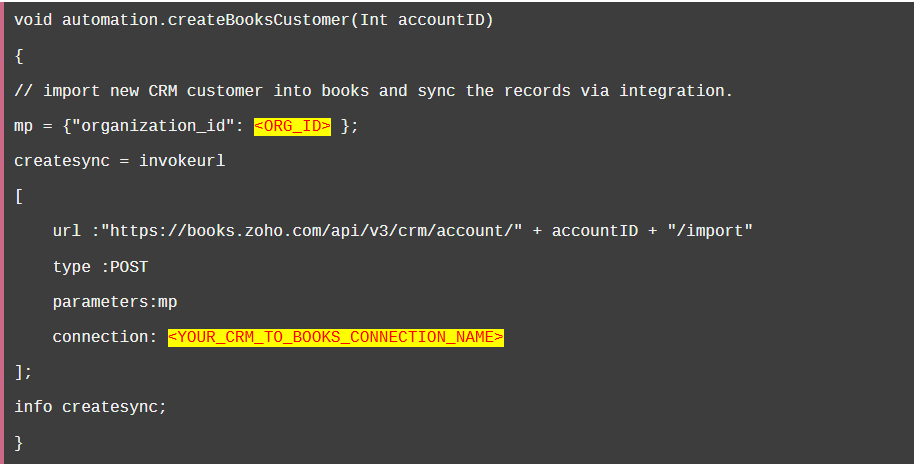
The following custom function ensures that when an account is added to Zoho CRM, it is instantly synced with Zoho Books.
Parameters and Variables
Parameter:
accountID: The unique ID of the CRM account. This is either passed at the workflow level or manually input when using the function as a standalone.
Variables:
<ORG_ID>: The Zoho Books organization ID specific to your instance.<YOUR_CRM_TO_BOOKS_CONNECTION_NAME>: The name of the integration connection you’ve set up between Zoho CRM and Books.
How It Works
Importing the CRM Customer to Books:
When the function is triggered, it imports the specified account (accountID) from Zoho CRM into Zoho Books using theimportAPI endpoint.Triggering the Integration:
The import process automatically initiates synchronization between CRM and Books. This ensures that any changes to the account in CRM are immediately reflected in Books, maintaining consistency across the two systems.Efficient Data Handling:
By triggering the sync at the function level, you eliminate the delay between system updates and reduce manual intervention.
When to Use This Function
This function is particularly useful in scenarios like:
- Onboarding New Clients: Ensure all customer details from CRM are immediately available in Books for invoicing and financial records.
- Real-Time Updates: When workflows require up-to-date data for tasks like reporting or automation triggers.
- Error Mitigation: Prevent discrepancies in data between CRM and Books that could lead to billing or operational errors.
Implementation Tips
- Set Up Connections: Ensure your Zoho CRM and Books integration connection is correctly configured with appropriate permissions.
- Test the Function: Before deploying, test the function on a sample account to confirm that records sync as expected.
- Monitor Logs: Use the
info createsynccommand to debug and track the success of the sync process.
Take Your Zoho Integrations Further
Automating syncs between Zoho applications is just one way to optimize your workflows. At Z1 Consultant, we specialize in customizing Zoho systems to fit your unique business needs. Whether you need help setting up integrations, optimizing workflows, or training your team, we’ve got you covered.
Schedule a call with us today to explore how you can unlock the full potential of your Zoho suite!
Have questions about the sync process? Drop them in the comments or reach out directly—we’re here to help!